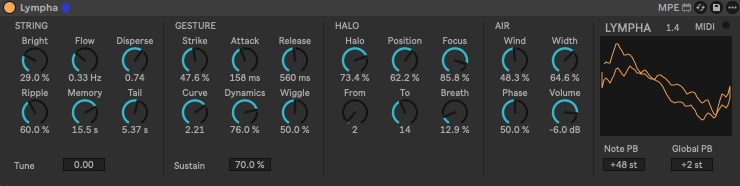
Lympha is a 16-voice Max for Live instrument made to be played with pressure, not just triggered. It was built around the Expressive E Osmose and tested with it. It follows the MPE standard, so other MPE controllers should work as well, and ordinary keyboards are supported too.
Each note is a virtual string seen as 32 slow modes, one per harmonic. Steady pressure gives a still, pure tone. Every fast gesture — a quick change of pressure, the initial strike, a sideways wiggle of the key — leaves ripples that keep swaying on their own, each harmonic at its own pace, and slowly die away. Release a key quickly and the string stays where it was and goes on sounding. The still part sits in the centre of the stereo image; the ripples move around it.
Free. A 27 KB zip with the device, four presets and the readme. For Ableton Live 12 with Max for Live, on macOS.
Requirements
- Ableton Live 12 with Max for Live (included in Live Suite).
- Made and tested with Live 12.4.6 (Max 9.1.5) on macOS, Apple Silicon. Not tested on Windows, on Live 11 or on Push in standalone mode.
- No external objects or extra files are needed: the device is a single .amxd.
Installation
- Copy Lympha.amxd into your User Library, in the folder Max for Live Devices.
- Create the folder Presets / Instruments / Max Instrument / Lympha in your User Library and copy the four .adv files into it. The presets then appear under Lympha.amxd in Live’s browser.
The presets look for the device in Max for Live Devices inside the User Library, so the first step matters. The location of your User Library is shown in Live’s Settings, on the Library page.
Playing it
With an MPE controller, after enabling MPE for its input in Live’s MIDI settings:
- Pressure
- sets the level and opens the spectrum. Slow pressure is smooth; quick changes leave ripples behind.
- Strike
- velocity plucks the string.
- Slide
- CC74 — on the Osmose, the aftertouch zone — brings out the Halo: a single harmonic that travels along the series, with a little air around it. The mod wheel moves it too.
- Sideways
- bends the pitch and stirs the string.
- Pedal
- the sustain pedal holds the notes.
With an ordinary keyboard or drawn MIDI notes, a held note that carries no pressure of its own sustains at a level set by its velocity and by the Sustain control. Channel or polyphonic aftertouch pushes it higher.
The small light next to “MIDI” flashes whenever MIDI reaches the device.
Controls
String
- Bright
- spectral slope: darker and purer to the left, more harmonics to the right.
- Flow
- how fast the first harmonic sways after a gesture.
- Disperse
- how the swaying speed changes going up the harmonics.
- Ripple
- how much wave a quick change of pressure leaves behind.
- Memory
- how long the waves last while the key is held.
- Tail
- how long the waves last after the key is released.
Gesture
- Strike
- how much the initial hit plucks the string.
- Attack
- how smoothly the string follows rising pressure.
- Release
- how smoothly the string follows falling pressure.
- Curve
- response to pressure.
- Dynamics
- how much pressure opens the spectrum.
- Wiggle
- how much sideways motion stirs the string.
- Sustain
- level of held notes that carry no pressure of their own.
Halo
- Halo
- level of the harmonic brought out by slide.
- Position
- starting point of the halo along the harmonic series.
- Focus
- how tightly the halo isolates one harmonic.
- From, To
- first and last harmonic of the halo’s travel.
- Breath
- air noise around the halo harmonic.
Air
- Wind
- continuous random stirring of the string.
- Width
- stereo spread of the waves.
- Phase
- character of the stereo motion.
- Volume
- output volume.
- Tune
- fine tuning in cents.
- Note PB
- per-note pitch bend range in semitones (Live sends 48).
- Global PB
- pitch bend range of the wheel in semitones.
Every control has a description in Live’s Info View. All parameters can be automated, modulated and mapped; on Push they are arranged in four banks: String, Gesture, Halo and Air.
Presets
Four presets come with the device: Lympha, the sound it opens with, then Origin, Strange and Glaciers.
Notes
- The output has a soft knee above −4 dBFS and cannot exceed full scale. Large chords played hard reach it; lower Volume for more headroom.
- Wind and Breath use noise, so two renders of the same clip are not identical sample for sample.